Modern Network Management
Free to start · Pro is yours to keep
ArkhiNet replaces the PuTTY session lists, IP spreadsheets, Visio diagrams and scattered client docs that network engineers and MSPs juggle every day. Vendor-agnostic, works offline, never stores passwords or keys, and free to start.
Windows 10/11 (x64) · No sign-up, no license key to download
The job is one workflow. Your tools aren't.
Managing multiple customer environments means stitching together a half-dozen disconnected tools. Every one of them is a place for information to go stale.
PuTTY / SecureCRT
Session lists that live on one tech's laptop
Spreadsheets
IP plans and device inventories that drift out of date
Visio
Topology diagrams nobody updates after the install
Shared drives
Client docs scattered across folders and inboxes
ArkhiNet pulls all of it into a single, fast desktop app.
Features
Everything for the environments you manage
Vendor-agnostic: Fortinet, Cisco, Palo Alto, Meraki, SonicWall, Sophos and whatever else your customers run.
Free covers an inventory of 9 devices, and a free email registration adds mirroring, SSH tunnels and file transfer. Anything marked Pro comes with Pro, along with unlimited devices.
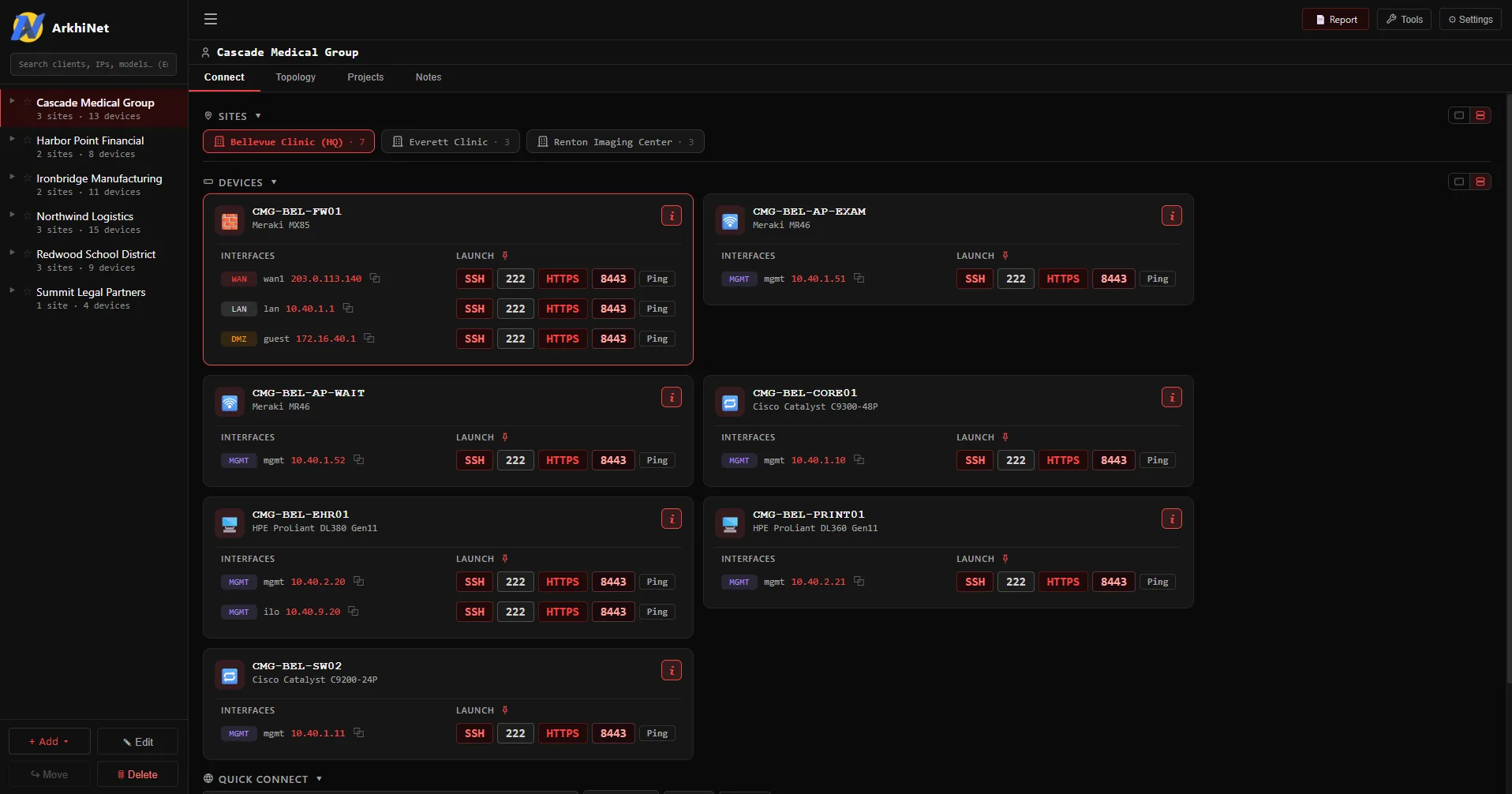
Clients, sites and devices
Every customer environment in one hierarchy: clients, their sites, the devices at each and every interface with its role. Tags, notes, HA pairs, serials, firmware, and Fortinet end-of-support dates flagged by color.
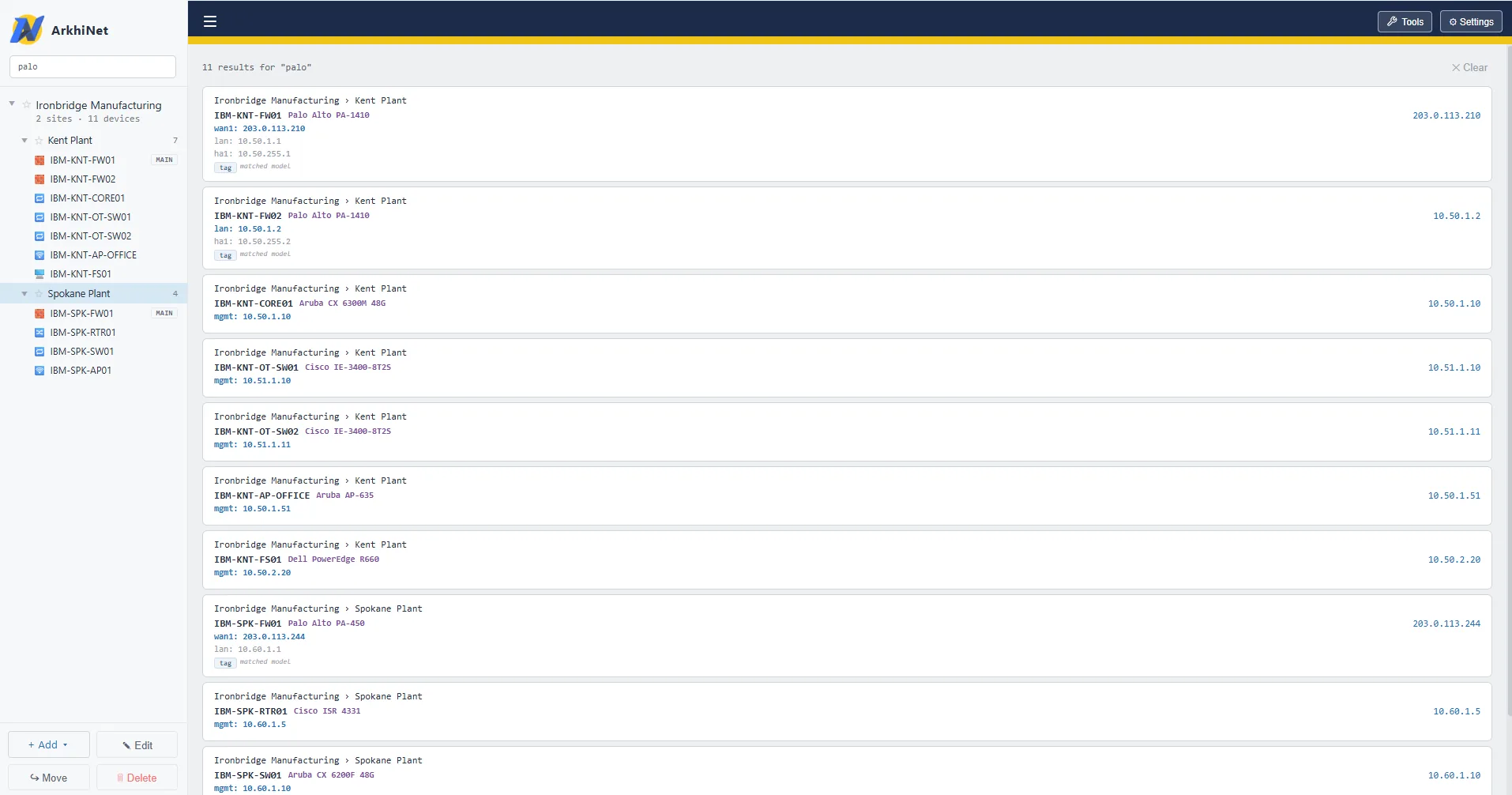
Find anything with Ctrl+G
One search across names, IPs, tags, models, firmware, serials and notes for every client. Press Enter to connect to the top hit.
One-click connect
Launch Buttons on every interface open SSH, Telnet, RDP, HTTP or HTTPS, plus a one-click ping. Set them once on a client and every site and device inherits them, with overrides where you need them.
A real terminal, in tabs
SSH, Telnet and serial sessions run in built-in tabs with up to four split panes. Save tab layouts, open PowerShell, cmd, Git Bash or WSL alongside, or type user@host into the quick-connect bar.
Pro Saved tabs are Pro.
Session tools
Session logging that records output, never what you type. A shared scripts library with {{variables}}, typing into every pane at once, and SSH tunnels.
Free Logging is free. Mirrored typing and SSH tunnels are free with a registration.
Pro Scripts and Send to terminal are Pro.
File transfer
A two-pane SFTP browser with drag-copy and a transfer queue, plus quick single-file SCP for gear without SFTP, like FortiGates. Opens WinSCP too, if you have it.
Free Free with a free registration.
Notepad and config compare
A built-in editor with FortiOS and IOS highlighting and Notepad++-style find and replace. Compare two configs side by side or inline.
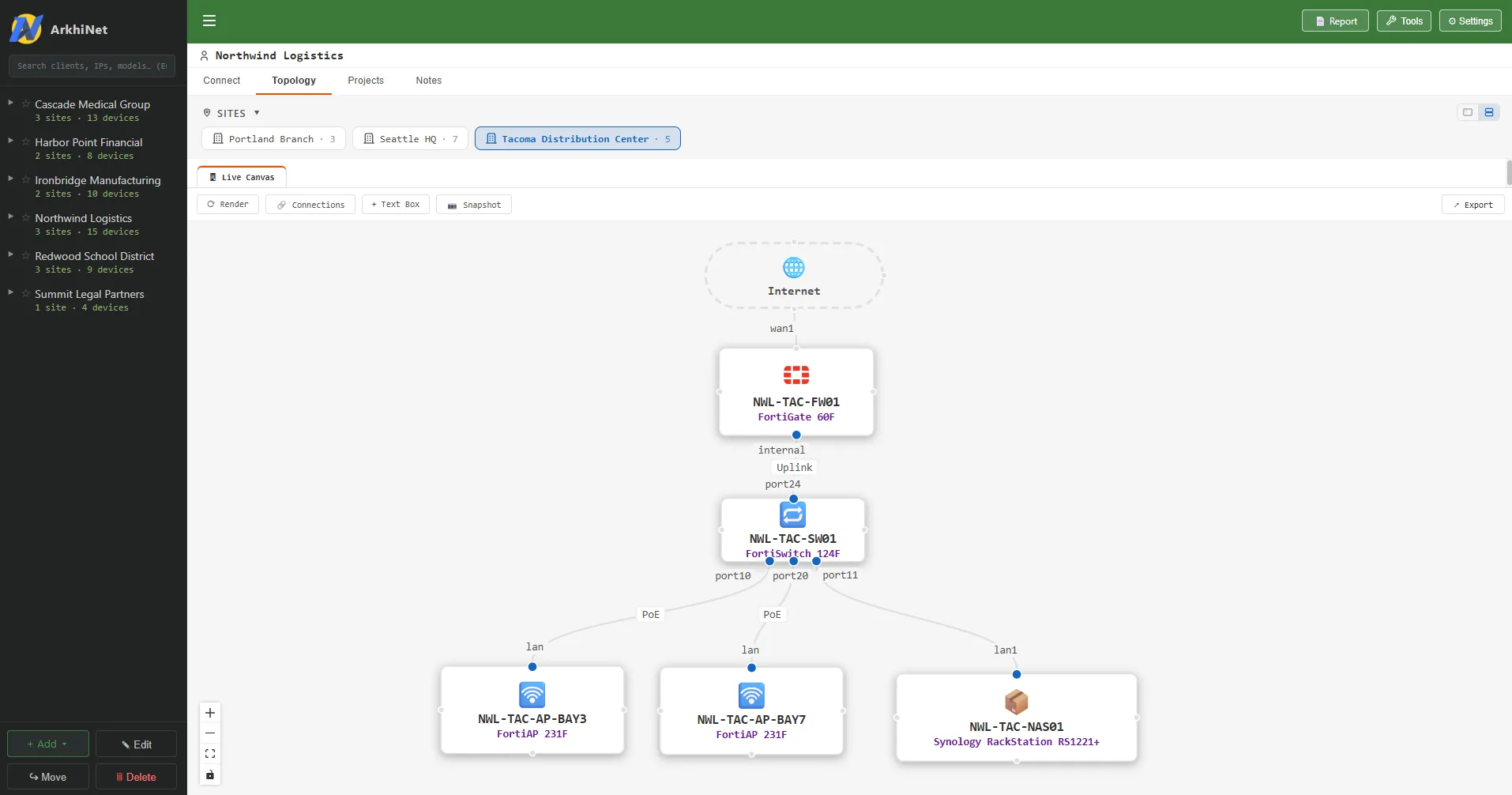
Topology that draws itself Pro
Site diagrams laid out automatically from the internet edge down, HA pairs side by side. Adjust by hand, add text boxes, keep dated snapshots, and export to PNG or PDF with a title block.
Branded PDF inventory reports Pro
Your logo, a cover page with stats, the clients you choose, color-coded end-of-support dates and optional site notes. Ready to hand to a customer.
Built-in engineering tools
Subnet calculator, port and network scanner with banner grabs and one-click add-to-inventory, IP, DNS and MAC lookup, and an MD5 firmware checker. Each opens as a tab beside your sessions.
Bring what you have
Import sessions from PuTTY and SecureCRT, or devices from CSV and Excel. Preview before importing, duplicates are skipped, and a backup is taken first. Passwords are never imported.
Projects, notes and themes
Per-client projects with dated task checklists, notes on every client and site. 21 built-in themes, from Fortinet, Meraki and Palo Alto to terminal-style themes like Matrix and Nord, a custom theme editor, and terminal color schemes, some animated.
Pro Free includes 4 themes (ArkhiNet, Fortinet, Light, Dark) with matching terminal colors. All 21, the theme editor and every color scheme are Pro.
Never stores passwords or keys
ArkhiNet deliberately keeps no device passwords or private keys, anywhere. It's a security decision, not a missing feature: there are no secrets in your data file to leak.
Your data, in your file
One data file wherever you choose: your PC, a network share or OneDrive. Optional AES-256 encryption, app lock, and rotating automatic backups. Works offline, with no telemetry.
Where it fits
Between PuTTY and Royal TS
Too much for a bare terminal, not the weight (or cost) of full enterprise tooling, while also replacing your diagrams, inventory sheets and client docs.
vs Royal TS
- + Client / MSP-oriented structure, not a flat connection tree
- + Built-in network topology diagrams (Royal TS has none)
- + Launch Buttons set once per client, inherited by every site and device
- + Projects & task tracking per client
- + Vendor-specific themes and built-in engineering tools
- + Auto-refresh with conflict detection
- + Pro is a one-time $99 with a year of updates, and yours to keep
vs SecureCRT
- + Documents clients, sites and devices, not just a list of saved sessions
- + Built-in network topology diagrams
- + Branded PDF inventory reports to hand clients
- + Built-in engineering tools: subnet calc, port/network scanner, IP, DNS & MAC lookup, firmware MD5
- + Built for an MSP workflow across any vendor
- + A free edition with no time limit, and Pro as a one-time purchase, not a subscription
vs mRemoteNG
- + MSP client/site/device documentation, not just a connection tree
- + Built-in network topology diagrams and branded inventory reports
- + Built-in engineering tools
- + Never stores passwords or keys, by design (mRemoteNG saves passwords in its connections file)
- + Commercially developed and supported
vs Termius
- + Documents clients, sites and devices, with interfaces, serials, firmware and end-of-support dates, not just a list of saved hosts
- + Built-in network topology diagrams and branded PDF inventory reports
- + Built-in engineering tools: subnet calc, port/network scanner, IP, DNS & MAC lookup, firmware MD5
- + Never stores passwords or keys, by design (Termius keeps them in its vault, synced to its cloud on paid plans)
- + Serial console connections on the free edition (Termius puts serial behind Pro)
- + Pro is a one-time $99, not a subscription (Termius Pro is $10/month, billed yearly)
Pricing
Free to start. Pro to keep.
Free covers the terminal and a small inventory. Pro unlocks the rest for one payment, and it's yours to keep. Buying for several engineers? Get as many copies as you need on one license key.
Launch pricing: Pro $79 (was $99), applied at checkout
Free
Try it on your own gear, at home or at work.
The terminal and connection workflow, free for good. Not a trial.
- ✓ Up to 9 devices in your inventory, no sign-up needed
- ✓ Quick connect to any host, as often as you like
- ✓ Built-in terminal: SSH, Telnet, serial, tabs, split panes, local shells
- ✓ Launch Buttons, the engineering tools, Notepad with config compare
- ✓ Import from PuTTY, SecureCRT, CSV and Excel
- ✓ 4 themes (ArkhiNet, Fortinet, Light, Dark) with matching terminal colors
- ✓ Encryption, app lock and backups: security is never a paid extra
- ✓ Register free with your email to add mirroring, SSH tunnels, File Transfer (SFTP) and Quick transfer (SCP)
- ✓ No license key to download
Pro
For the engineer who lives in it.
A year of updates included, then $39/year to renew (normally $49), only if you want to. That price stays yours for every renewal.
Yours to keep: one payment, and it keeps working after the update year.
Everything in Free, plus:
- ✓ Unlimited devices in your inventory · use on up to 2 computers
- ✓ Topology diagrams with PNG and PDF export
- ✓ Branded PDF inventory reports
- ✓ Scripts with {{variables}} and Send to terminal
- ✓ Saved tabs
- ✓ All 21 themes, the theme editor and every terminal color scheme
- ✓ Email support
One license key covers every copy, 2 computers each. Up to 50 copies per order; for more, get in touch.
Devices are the network gear you document in ArkhiNet. Computers are the machines you activate a Pro license on. Over the free device limit, nothing is deleted or hidden: every device still opens and connects, you just can't add more. Prices in USD; billing, invoicing and tax are handled by Paddle, our merchant of record.
Download ArkhiNet for Windows
Install it and start documenting. Free has no time limit, and the download needs no account, license key or email. Move to Pro whenever you need more.
Digitally signed .exe · Windows 10/11 (x64) · Free to start
macOS and Linux are on the roadmap, not yet available.
Need topology, reports and unlimited devices? See Pro.